
Langflow 1.11.0 ships a feature that has been a long time coming for serious RAG practitioners: first-class multi-vector retrieval.
With the new lfx-nextplaid extension bundle, Langflow flows can now use ColBERT-style late interaction and ColPali-style visual document retrieval out of the box, with no custom glue code required.
This post walks through what changed, why it matters, and how to use the NextPlaid bundle in a flow.
The problem with single-vector retrieval
Every vector store in Langflow operates on the same basic model: encode a document into one vector, encode a query into one vector, compute cosine similarity, and return the top-k. It is simple, fast, and scales well. For many tasks, it is perfectly adequate.
But a single vector is a lossy summary. When you embed an entire paragraph into 768 or 1536 dimensions, you are compressing hundreds of token-level concepts into a single point in space. The embedding is forced to average out semantic nuance. A document about "the effect of central bank policy on mortgage rates" and a query about "how does the Fed affect housing affordability" might not score well because the pooled representations drift apart, even though, token by token, the overlap is substantial.
This compression penalty shows up most prominently in two scenarios:
- Long or information-dense documents. A ten-page technical report cannot be faithfully summarized into one vector. Chunking helps but introduces its own problems: chunk boundaries fragment context, and a single chunk rarely contains the full answer.
- Visually complex documents. A PDF slide deck or a scanned research poster carries information in figures, tables, equations, and layout, none of which survives the "extract text, embed text" pipeline. Embedding a page image into one vision-language vector compresses all of that spatial and semantic structure into a single point.
Multi-vector retrieval addresses both of these penalties at the representation level.
How ColBERT solves the problem with late interaction
ColBERT (Contextualized Late Interaction over BERT) was introduced by Khattab and Zaharia at Stanford in 2020 and has since become one of the highest-quality retrieval paradigms available. The key idea is deceptively simple: instead of pooling a document into one vector, keep all token embeddings.
At index time, each document becomes a matrix of shape (n_tokens, dim), one row per token. At query time, the query is also encoded into a matrix (n_query_tokens, dim). Scoring is then computed as MaxSim: for each query token, find the maximum dot product across all document tokens, and then sum those maxima across query tokens.
score(q, d) = Σ_{i ∈ q_tokens} max_{j ∈ d_tokens} (q_i · d_j)
This late interaction step allows each query token to independently find its best match in the document, rather than forcing the comparison to happen in a collapsed, pooled space. The result is substantially higher retrieval quality, especially on queries that require matching specific sub-concepts within a long passage.
ColPali extends this idea to images. A vision-language model (such as ColModernVBERT) encodes document page images into a matrix of patch embeddings (n_patches, dim). Text queries are still embedded as token matrices. MaxSim scoring then matches query tokens against image patches, enabling true visual document retrieval: the model can match a text query like "quarterly revenue breakdown" against the patch of the document that contains the relevant chart, without any OCR in the loop.
PLAID: making multi-vector fast at scale
ColBERT's accuracy comes at a cost. Storing a matrix per document, instead of a single vector, multiplies storage by the average document length in tokens. Doing exact MaxSim over millions of documents per query is prohibitively slow.
PLAID (Performance-optimized Late Interaction Driver) is the indexing and retrieval algorithm developed alongside ColBERT v2. It introduces two optimizations:
- Residual quantized vectors. Token embeddings are compressed to 2 or 4 bits per dimension using learned codebooks. A typical 128-dimensional float32 token vector (512 bytes) becomes 32 to 64 bytes. This makes the index fit in memory even for large corpora.
- Centroid-based candidate pruning. PLAID clusters all token embeddings into a flat IVF (Inverted File Index). At query time, each query token probes only a small number of IVF cells (controlled by
n_ivf_probe), rapidly identifying candidate documents without comparing against every token in the corpus. Exact MaxSim re-ranking is then applied only to the resulting candidate set (controlled byn_full_scores).
The result is ColBERT-quality retrieval with latency and storage characteristics that make production deployment realistic.
NextPlaid: ColBERT retrieval as a Rust service
NextPlaid is a high-performance PLAID index server written in Rust, originally developed by LightOn (check out their other exciting work). It exposes a clean REST API over an Axum web server, backed by an MmapIndex (memory-mapped PLAID index) and a SQLite database for metadata.
To start the NextPlaid server in a Docker container, run:
git clone https://github.com/meetdoshi90/next-plaid.git
cd next-plaid
docker compose up -d
The server starts on port 8080, and serves a Swagger UI at http://localhost:8080/swagger-ui.
For more information on configuring the NextPlaid server, see the NextPlaid documentation.
NextPlaid in Langflow
langchain-plaid is the Python client that connects LangChain and Langflow to the NextPlaid server.
Langflow PR #13553 adds the langchain-plaid client as the lfx-nextplaid extension bundle, including two components:
- NextPlaid: connects a running NextPlaid server for ingestion and search
- vLLM Multivector Embeddings: produces the token-matrix embeddings NextPlaid needs from a ColBERT-compatible model served by vLLM.
Langflow 1.11.0 includes the lfx-nextplaid bundle, but if you need to install the bundle separately, in your Langflow virtual environment, run:
uv pip install lfx-nextplaid
Restart Langflow to load the new components.
Build a multi-vector RAG flow using Langflow
Prerequisites:
- Langflow 1.11.0 or later
- A running NextPlaid server. For more information, see the NextPlaid documentation.
- A vLLM server with a ColBERT-compatible model loaded via
--runner pooling. For example:
vllm serve answerdotai/answerai-colbert-small-v1 \
  --runner pooling \
  --pooler-config '{"task": "token_embed"}'
For more information, see the vLLM pooling models documentation.
The fastest path is to start from the Vector Store RAG template and swap the store and embeddings:
- In Langflow, create a flow from the Vector Store RAG template.
- Delete the existing vector store (for example Astra DB or Chroma) and its single-vector embedding model.
- Add a vLLM Multivector Embeddings component. Set vLLM API Base to your vLLM server (default
http://localhost:8000) and Model Name to your ColBERT model. - Add a NextPlaid component. Set Server URL to your NextPlaid server (default
http://localhost:8080) and connect vLLM Multivector Embeddings to Embedding (Multivector). - On the ingestion side, connect a component that outputs
Data/JSONto NextPlaid's Ingest Data input, such as a Mock Data component. On the NextPlaid component, click Run component to index. - On the query side, keep the template's default of chat input, search through NextPlaid, prompt/LLM, and then chat output.
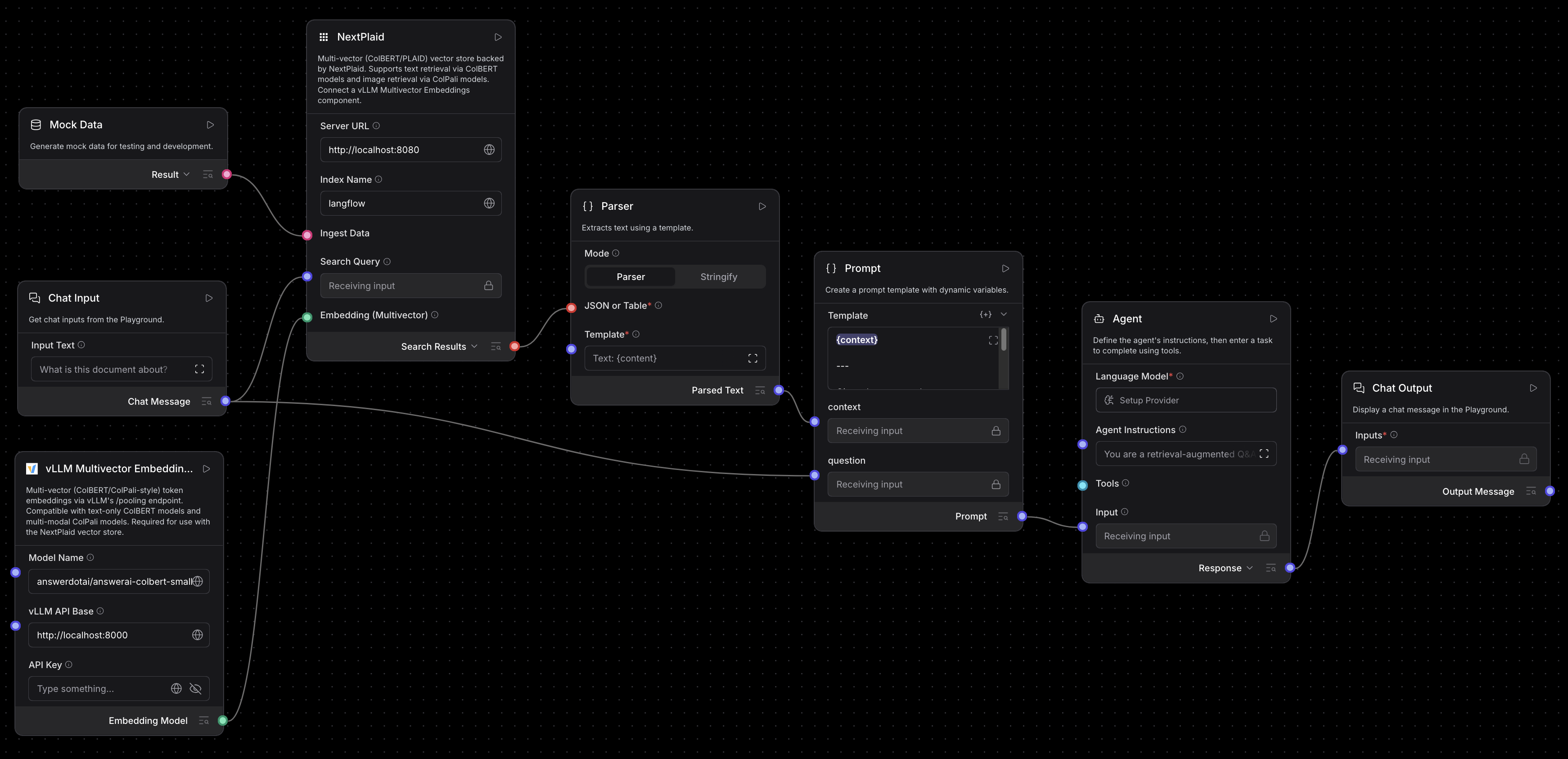
For more information, see NextPlaid.
Results
Evaluations were run on two benchmarks: RealMMRAG-TechReport (long technical PDF documents) and ViDoRe v3 (visually rich document pages, English subset averaged across HR, Finance, Industrial, Pharmaceutical, and CS domains).
Experimental setup
| Role | Model |
|---|---|
| Chunking | sentence-transformers/all-MiniLM-L6-v2 |
| Image OCR | lightonai/LightOnOCR-2-1B |
| Image captioning | ibm-granite/granite-vision-3.3-2b |
| Text, single vector | ibm-granite/granite-embedding-english-r2 |
| Text, multi-vector | lightonai/ColBERT-Zero |
| Image, single vector | ModernVBERT/bimodernvbert |
| Image, multi-vector | ModernVBERT/colmodernvbert |
Three retrieval strategies are compared: single-vector (DPR baseline), rerank (single-vector top-100 re-scored by the multi-vector model), and PLAID (full multi-vector indexing and retrieval via NextPlaid).
RealMMRAG-TechReport (Recall@10)
| Retrieval strategy | Score |
|---|---|
| Text, single vector | 73.7 |
| Text, single vector top-100 + multi-vector rerank | 90.7 |
| Text, multi-vector via PLAID | 94.7 |
| Image, single vector | 22.6 |
| Image, single vector top-100 + multi-vector rerank | 56.6 |
| Image, multi-vector via PLAID | 89.7 |
On long technical reports, multi-vector retrieval via PLAID adds 21 points over single-vector for text and an enormous 67 points for direct image retrieval. Even the rerank approach, which runs both models, leaves 4 to 33 points on the table compared to full PLAID indexing.
ViDoRe v3 English (avg score)
| Retrieval strategy | Score |
|---|---|
| Text, single vector | 49.0 |
| Text, single vector top-100 + multi-vector rerank | 57.4 |
| Text, multi-vector via PLAID | 57.6 |
| Image, single vector | 17.9 |
| Image, single vector top-100 + multi-vector rerank | 39.9 |
| Image, multi-vector via PLAID | 46.5 |
On visually diverse documents, the image gap is equally stark: direct image retrieval via ColModernVBERT and NextPlaid reaches 46.5 versus 17.9 for single-vector, more than 2.5 times higher, without any OCR or text extraction in the pipeline. Text multi-vector and its rerank variant are within 0.2 points of each other here, suggesting the bottleneck on this benchmark shifts toward visual understanding rather than retrieval precision.
See also
- PyPI package: pypi.org/project/langchain-plaid
- Langflow PR: langflow-ai/langflow#13553